
Project management for 3D studios
One ticket per image, one page per client job.
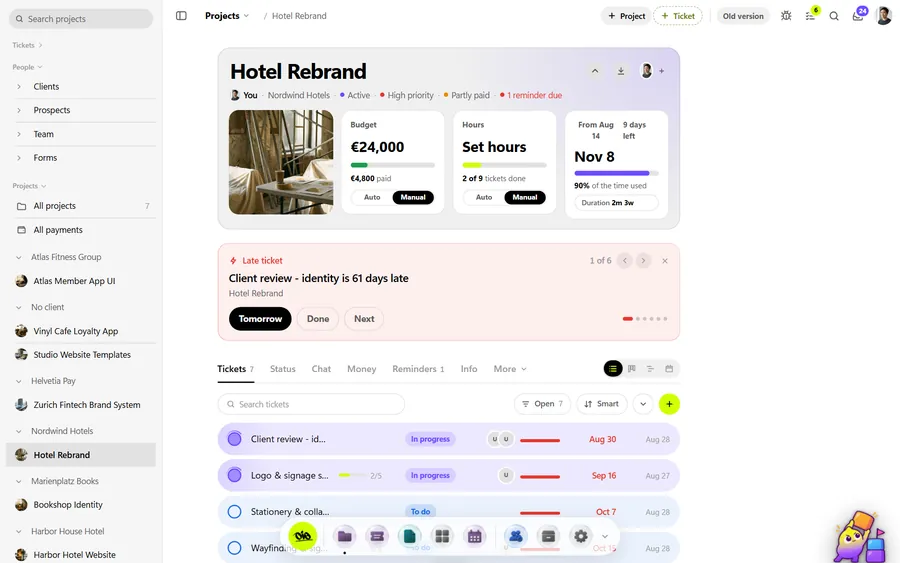
Product renders, packshots, exploded views, turntables, a few animated loops for the launch. The job is a list of deliverables, each with its own feedback and its own deadline, and half of them are modelled by a freelancer. OIO gives the job one project page and each deliverable one ticket, with the quote and the invoice on the same project.
No card. Set up takes ten minutes.
Where the job goes wrong
A typical product job starts with CAD files that arrive late and in the wrong format, a brand guide, and a reference board the client made in a hurry. Then it splits: eight stills, a 360 turntable, two lifestyle scenes with a freelancer doing the set.
Feedback comes back per image, in an email with a PDF of screenshots, or in a call. By the third round nobody is sure which notes were done, which colourway the client approved, or whether the freelancer saw the latest list. The render deadline does not move.
How a 3D job runs in OIO
- 1
Brief and source files
The client sends CAD or STEP files, product photos, the brand guide and references. Something is always missing.
In OIO: The project page holds the brief, the files and the deadline. References go on the project whiteboard, so the moodboard and the brief sit next to each other.
- 2
Break the job into deliverables
Hero packshot, three angles on white, an exploded view, a turntable, two lifestyle scenes. Each has its own resolution, its own aspect ratio and often its own deadline.
In OIO: One ticket per image or shot, with a start and end date. The kanban shows what is in progress, blocked or done; the timeline shows the deliverables against the launch date.
- 3
Modelling and lookdev with freelancers
A freelancer builds the environment or the product model while the studio does lighting and materials.
In OIO: Send the freelancer the ticket link. They read the brief, download the references, upload clay renders, answer comments and mark the ticket done. No account and no seat.
- 4
Client feedback rounds
Notes come in per image: "make the logo emboss deeper", "warmer key light", "swap to the matte black colourway". Rounds pile up.
In OIO: Upload each round as a new version of the image. Send the client the ticket link and they pin notes on the render without an account; pins the team resolves drop off the open list. Set the ticket to hold while you wait on the client.
- 5
Finals and delivery
Full-resolution stills, layered files on request, the turntable as video.
In OIO: Send the finals with a download link that expires after 1, 7 or 30 days, up to 1 GB for a video file. The client's status link shows which deliverables are done.
- 6
Quote, freelancer cost, invoice
The quote was per image. The freelancer invoices you in their own currency.
In OIO: The quote and the invoice come from the project, with lines like 8 x packshot at a price per image. Record the freelancer's fee on the same project in their currency, at that day's rate.
Quoting per image
Most product work is quoted per image with a set number of feedback rounds, plus the modelling as its own line when the client has no usable CAD. In OIO each of those is a line on the quote with a quantity, a unit and a price, so 8 images at one price and a turntable at another read the way the client thinks about them.
When a client asks for a fourth round on an image quoted with two, add it as a line on the next invoice. The checklist on the ticket shows what was asked in each round, which makes that conversation shorter.
What OIO does not do
Better to know before you move a live job over.
- Clients pin numbered notes on a render and comment on a turntable at the second, but there is no freehand drawing and no pins on a PDF or a 3D model. The compare slider works on still images only.
- There is no 3D viewer, and the video player has no frame stepping or colour management. For frame-accurate grading notes, keep a dedicated review tool.
- There are no plug-ins for Blender, 3ds Max, Maya or Cinema 4D, and no render farm connection.
- There is no time tracker. Hours on a ticket are a number you enter.
See it working
Short recordings of the real app, click to play.
What it costs
Free for one project with every app on, no card. Solo $19 a month, Studio $99 a month for 5 seats. People who only view, and freelancers on a ticket link, use no seat.
Start with one free projectNo card. Set up takes ten minutes.
Questions
Can my client mark up renders in OIO?
Yes, with pins. The client opens the ticket link, clicks a spot on the render and writes the note, with no account. Each pin gets a number, and the team resolves it when it is done. On a video they comment at the moment and can pin a spot on the paused frame. There is no freehand drawing and no pins on a PDF.
How do I keep track of revision rounds?
Upload each round as a new version of the image, so the ticket holds v1, v2 and v3 and you can compare two with a slider. The pins stay on the version they were made on. OIO has no round counter, so the number of rounds against the quote is yours to count.
Do my freelancers need a seat or an account?
No. You send a freelancer a link to one ticket. In a browser they read the brief and the checklist, download the files, upload their work, comment and set the ticket to done. Only people who edit inside the studio account take a seat.
Can I quote per image in any currency?
Yes. Quote lines take a quantity, a unit and a price, and the quote and the invoice can be in any currency. The freelancer's cost goes on the same project in their currency, stamped with that day's rate.
Does it work for animation as well as stills?
Yes: one ticket per shot or per deliverable, dates on the timeline, files and comments on the ticket. Upload a pass to the ticket and the client comments on it at the second, each comment a numbered marker on the timeline, then approves the version.
Further reading
- Best project management software for 3D studios (2026)
- Managing freelancers in a small 3D studio
- ShotGrid alternatives for small studios
- OIO vs ShotGrid
- A ClickUp alternative for creative studios
- Project management for archviz studios
- Project management for motion design studios
- Project management for small VFX studios
- Project management for animation studios
- Project management for video production
- Project management for design and branding studios
- Project management for interior visualisation
- Project management for game art studios
- Project management software for agencies
- OIO for studios that work with freelancers